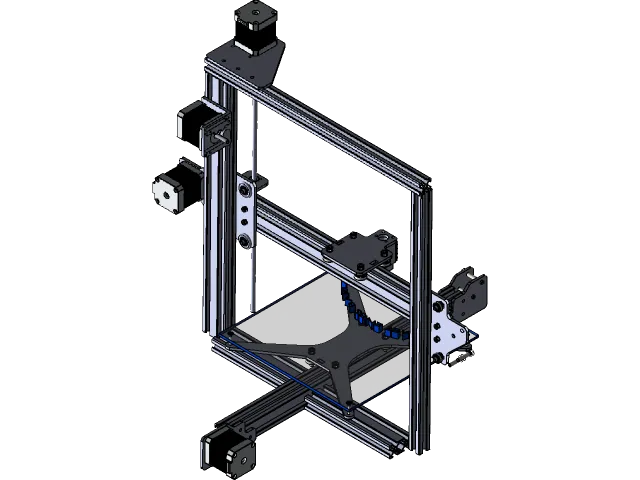
Tevo Tarantula USA Top 5 Printing Tips
The Tevo Tarantula USA is a popular 3D printer known for its affordability and versatility, making it a great choice for both beginners and experienced hobbyists. However, like any 3D printer, achieving high-quality prints requires understanding and implementing some key printing tips. This guide provides five essential tips to help you optimize your Tevo Tarantula USA and consistently produce impressive 3D models. Following these tips will not only improve the quality of your prints but also enhance your overall 3D printing experience, reducing frustration and maximizing your printer’s potential. Whether you’re printing functional parts, prototypes, or decorative objects, these tips will provide a solid foundation for successful 3D printing.
Leveling the Bed for Perfect Prints
Leveling the print bed is arguably the most crucial step in 3D printing. An unlevel bed can lead to a host of issues, including poor first-layer adhesion, warped prints, and even damage to your printer’s nozzle or bed. Proper bed leveling ensures that the initial layer of filament adheres correctly to the bed surface, providing a solid foundation for the rest of the print. This is particularly important with the Tevo Tarantula USA, as its open-frame design and potentially less rigid construction can make bed leveling a bit more challenging. Investing time in accurate bed leveling will save you time, filament, and frustration in the long run.
How to Level Your Bed

The Tevo Tarantula USA typically uses manual bed leveling, which involves adjusting the bed’s height using knobs located under the print bed. Start by preheating your bed to the appropriate temperature for your chosen filament. Then, use a piece of paper or a feeler gauge to check the distance between the nozzle and the bed at each corner. Adjust the bed-leveling knobs until the nozzle lightly grips the paper or the feeler gauge has a slight friction. Repeat this process at each corner, making small adjustments until the nozzle is consistently the correct distance from the bed across the entire surface. Consider using a leveling check pattern to ensure a consistent first layer. Remember, patience and precision are key to achieving a perfectly leveled bed.
Importance of Proper Bed Adhesion
Bed adhesion refers to the ability of the first layer of filament to stick securely to the print bed. Without good bed adhesion, your print will likely detach from the bed during printing, resulting in a failed print. Several factors influence bed adhesion, including bed leveling, bed surface, and filament type. The Tevo Tarantula USA often comes with a heated bed, which is essential for ensuring good adhesion, especially when printing with materials like ABS or PETG. Understanding and addressing these factors are critical for successful 3D printing.
Different Adhesion Methods
Several methods can improve bed adhesion. Using blue painter’s tape or a specialized 3D printing surface, such as a BuildTak sheet, can provide a good surface for the filament to adhere to. Applying a thin layer of glue stick or hairspray to the bed can also enhance adhesion, particularly for materials like ABS. Adjusting the initial layer height and print speed can also affect adhesion; a slower initial print speed and a slightly squished first layer often improve the bond. Experimenting with different methods and materials will help you find the best solution for your specific filament and printing needs.
Optimal Print Speed Settings

Print speed is another critical factor that significantly impacts print quality. Printing too fast can lead to layer shifting, under-extrusion, and poor surface finish, while printing too slow can extend print times unnecessarily. Finding the optimal print speed for your Tevo Tarantula USA requires balancing speed and quality, taking into consideration the filament type, model complexity, and desired level of detail. Experimentation is key, and you should make incremental adjustments to your print speed to find the ideal settings for each print.
Understanding Print Speed
Print speed refers to the rate at which the printer extrudes filament and moves its print head. It’s typically measured in millimeters per second (mm/s). Different aspects of a print, such as the initial layer, infill, and outer perimeters, can be printed at different speeds. The initial layer often benefits from a slower speed to ensure good bed adhesion, while infill can usually be printed at a faster speed. Outer perimeters should be printed at a moderate speed to maintain the dimensional accuracy and surface finish. Understanding these different speeds and how they relate to print quality is essential for optimizing your print settings.
Adjusting Print Speed for Quality
When adjusting print speed, start with the recommended settings for your filament and gradually increase or decrease the speed, observing the results. If you notice issues like stringing, under-extrusion, or layer shifting, reduce the print speed. If the print quality is good, you can try increasing the speed slightly to see if you can reduce print time without compromising quality. Pay close attention to the cooling capabilities of your printer. If your printer has limited cooling, printing at slower speeds may be necessary to allow the layers to cool properly. The optimal print speed will vary depending on the specific model, filament, and printer configuration.
Filament Selection and Quality

The type and quality of the filament you use have a significant impact on the success of your 3D prints. Different filaments have different properties, such as melting temperature, flexibility, and shrinkage, which affect their suitability for various applications. Choosing the right filament and ensuring its quality are crucial for achieving the desired results with your Tevo Tarantula USA. Experimenting with different filaments allows you to discover the best materials for your specific printing needs.
Choosing the Right Filament Type
PLA (Polylactic Acid) is a popular choice for beginners due to its ease of printing, low warping, and biodegradability. ABS (Acrylonitrile Butadiene Styrene) is a more durable material, suitable for functional parts, but requires a heated bed and may produce fumes. PETG (Polyethylene Terephthalate Glycol) offers a good balance of strength, flexibility, and ease of printing. Consider the properties of each filament type when selecting the best one for your project. Researching the specific characteristics of different filaments will allow you to make informed decisions based on your printing requirements.
Storing Filament Correctly
Proper filament storage is essential to maintain its quality and prevent printing problems. Filament can absorb moisture from the air, leading to issues like stringing, bubbling, and poor layer adhesion. Store your filament in a cool, dry place, away from direct sunlight. Consider using airtight containers with desiccant packets to further protect your filament from moisture. Regularly checking the filament for signs of moisture absorption, such as brittleness or changes in appearance, will help you catch problems early and ensure consistent print quality.
Temperature Settings
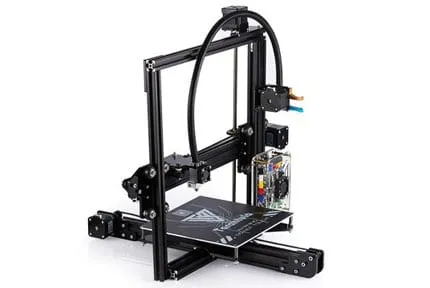
Temperature settings are another critical aspect of 3D printing. Both the nozzle temperature and the bed temperature affect the way the filament melts, extrudes, and adheres to the bed. Incorrect temperature settings can lead to various problems, including under-extrusion, warping, and poor layer adhesion. Finding the optimal temperature for your filament is essential for producing high-quality prints with your Tevo Tarantula USA. The recommended temperature settings vary depending on the filament type, so it’s crucial to consult the filament manufacturer’s guidelines.
Finding the Perfect Temperature for Your Filament
Start by referring to the filament manufacturer’s recommended temperature range. Then, print a temperature tower, a test model designed to assess print quality at different temperatures. This allows you to visually identify the optimal temperature for your specific filament and printer setup. Adjust the nozzle temperature in small increments, observing the print quality at each setting. Look for consistent extrusion, good layer adhesion, and minimal stringing or oozing. Similarly, adjust the bed temperature based on the filament recommendations and the specific print surface you are using. Careful temperature calibration will ensure optimal print quality.
Troubleshooting Temperature Issues
Common temperature-related issues include under-extrusion (too cold), stringing (too hot), and warping (bed too cold). If you experience under-extrusion, try increasing the nozzle temperature. If stringing is an issue, reduce the nozzle temperature or adjust retraction settings. If your prints are warping, increase the bed temperature (for materials like ABS) or improve bed adhesion. Consistent monitoring and adjustment of temperature settings will help you overcome printing challenges and achieve excellent print results.
Slicing Software for Print Quality

Slicing software is an essential tool in the 3D printing process. It converts 3D models into instructions that the printer can understand, determining how the model will be built layer by layer. The settings within the slicing software have a significant impact on print quality, print time, and material usage. Choosing the right slicing software and optimizing its settings are crucial for achieving successful prints with your Tevo Tarantula USA. Experimenting with different slicer settings will allow you to fine-tune your prints and achieve the desired results.
Choosing a Slicing Software
Several slicing software options are available, including Cura, PrusaSlicer, and Simplify3D. Cura is a popular, free, and open-source slicer with a user-friendly interface and extensive features. PrusaSlicer is another excellent option, known for its advanced features and ease of use. Simplify3D is a paid slicer with powerful capabilities and advanced control over print settings. Consider factors such as ease of use, features, and community support when selecting your slicing software. Each software offers different advantages, so experiment to find the one that best suits your needs and preferences.
Optimizing Slicer Settings
Within your chosen slicing software, many settings affect print quality. These include layer height, infill density, print speed, temperature, and retraction settings. Experimenting with these settings is essential to optimize your prints. A lower layer height generally results in higher detail but increases print time. The infill density affects the strength and weight of the print. Retraction settings control the movement of the filament during travel moves, minimizing stringing. Regularly review and adjust your slicer settings based on the filament and print requirements to ensure the best print quality possible.
By mastering these five essential printing tips – bed leveling, print speed, filament selection, temperature settings, and slicing software – you can significantly improve the quality of your prints and your overall 3D printing experience with the Tevo Tarantula USA. Remember to be patient, experiment with different settings, and continuously refine your techniques to achieve the best results. Happy printing!